

Pinterest Keyword Research: Find What People Search For (2026)
Learn Pinterest keyword research step by step: autocomplete, guided search, Pinterest Trends and Predicts, plus a simple keyword sheet for every board.


In this article 12 sections
- Pinterest keyword research works best when you combine autocomplete, guided search bubbles, related searches and Pinterest Trends.
- Pinterest users phrase searches differently from Google users, so confirm every keyword inside Pinterest before you use it.
- Pinterest Trends shows relative interest and timing, so check the US and UK regions separately and publish seasonal pins before the line starts rising.
- Use Pinterest Predicts only for trends that genuinely fit your blog's topics.
- A simple keyword sheet per board and per article keeps your research organized and easy to reuse.
Pinterest keyword research means finding the exact words people type into Pinterest search, then using them in your board names, pin titles, descriptions and alt text. The fastest free method combines search bar autocomplete, guided search bubbles, related searches and Pinterest Trends, then logs the best terms in a simple keyword sheet.
This guide shows you how to find keywords on Pinterest step by step, using a real blog topic as the example. If you're new to the platform, start with our step-by-step Pinterest blogging guide, then come back here once your account is ready.
How is Pinterest keyword research different from Google?
Pinterest works like a visual search engine, but people use it differently from Google. On Google, someone usually wants an answer right now. On Pinterest, they are often planning something: an outfit, a routine, a project or a big life change. That planning mindset shapes the words they type.
Pinterest searches also tend to be shorter and more visual. People add words like "ideas", "aesthetic", "outfit" or "checklist" because they expect to browse images, not read a single page.
Here's how one Boredlisted topic, job interview prep, typically looks on each platform. The searches below are examples of common patterns, not measured volumes.
| Factor | ||
|---|---|---|
| Typical searches | how to prepare for a job interview, common interview questions and answers | job interview outfit women, job interview tips, interview prep checklist |
| What the searcher wants | A direct answer or a complete guide | Ideas to save, compare and come back to |
| Best content format | A long article with clear headings | A vertical pin with a strong headline that links to the article |
| Where keywords go | Title tag, headings, body text, URL | Pin title, description, board name, alt text |
| How you measure demand | Monthly search volume in keyword tools | Relative interest over time in Pinterest Trends |
| Timing | Often steady through the year | Often seasonal, rising weeks before a peak |
The lesson: don't paste your Google keyword list straight into Pinterest. Use it as a starting point, then let Pinterest show you how its own users phrase the same idea. For a refresher on the Google side, our guide to keyword research for beginners covers volume, difficulty and intent.
What do you need before you start?
You don't need any paid tools. Have these ready:
- A Pinterest business account. It's free and gives you Pinterest Trends inside your dashboard. If you still use a personal profile, first set up a Pinterest business account.
- A list of 5 to 10 seed topics. These are the broad subjects your blog already covers, such as "job interview", "resume" or "remote work".
- A spreadsheet. Google Sheets, Excel or Numbers all work. You'll build your keyword sheet here in Step 6.
- Some healthy skepticism. Pinterest tailors suggestions partly to your own activity, so treat any single result as a clue, and confirm important choices in Pinterest Trends.
Your first board will take the longest. Once the process clicks, researching keywords for each new article goes much faster.
Step 1: Turn your blog topics into seed keywords
Seed keywords are the short, broad terms you type into Pinterest to start the hunt. Pull them from articles you already have or plan to write, because every pin needs a page to send people to.
For a Boredlisted article such as our guide on how to find a job, the seeds might be:
- job search
- job interview
- resume
- career change
Keep seeds to one or two words. Pinterest will expand them into longer phrases in the next steps. If you need more seed ideas, the free methods for finding what people are searching for make a good warm-up before you open Pinterest.
Step 2: Mine the Pinterest search bar autocomplete
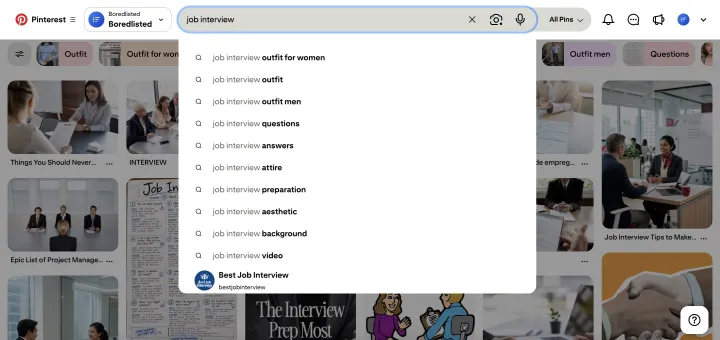
Autocomplete is the simplest source of Pinterest search keywords, and it reflects what people actually type.
- Click the search bar on desktop, or tap the search icon in the app.
- Type your seed slowly, for example "job interview".
- Write down every suggestion that drops down before you press Enter.
- Add a space and a letter ("job interview a", "job interview b") to surface more variations.
- Try question starters too, such as "how to" or "what to" in front of your seed.
For our example, you'll typically see phrases like "job interview outfit", "job interview tips" and "job interview questions and answers". Copy each one into your sheet and mark the source as Autocomplete.
Expected result: a list of longer, more specific phrases for each seed, including some you would never have guessed. If a seed returns almost nothing, it's either too niche or phrased differently on Pinterest, so try a synonym.
Step 3: Use guided search bubbles and related searches
Once you press Enter, the results page gives you two more keyword sources. Both reveal how people narrow down or branch out from a broad search.
Guided search bubbles
Guided search bubbles are the row of colored keyword tiles that appear just under the search bar after you search. Each one adds a word to your query. Searching "job interview" might show bubbles such as "outfit", "questions", "tips" or "nails".
Click a bubble and a new set appears, so you can go two or three levels deep. That path, for example "job interview" then "outfit" then "women", hands you a ready-made long-tail keyword: "job interview outfit women".
Related searches
Scroll down the results and Pinterest often shows a block of related or suggested searches between the pins. These tend to be sideways ideas rather than narrower ones, such as "first day of work outfit" or "salary negotiation tips" for our interview example.
Related searches are ideal for planning new boards or future articles. Pinterest tests its layout often, so the label and position can change, but the idea stays the same: these are terms people searched close to yours.
Step 4: Check demand and timing in Pinterest Trends
Autocomplete tells you what people search. Pinterest Trends tells you how interest in a term changes over time and when it peaks. It's the closest thing Pinterest offers to a keyword volume tool.
According to Pinterest's help page for the Trends tool, it shows up to two years of search, save and shopping trends by region. To open it:
- Log in to your Pinterest business account.
- Click the menu icon at the top left.
- Under Analyze performance, choose Pinterest Trends.
- Click Region at the top right and pick United States.
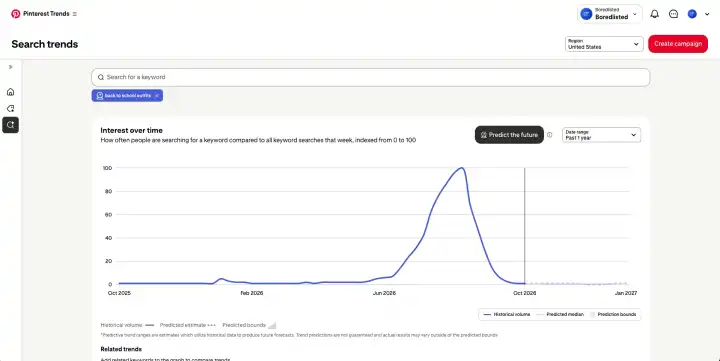
- Enter a keyword from your sheet to see its trend chart.
Then check the same keywords with the region set to United Kingdom. Pinterest Trends shows relative interest, not exact search counts, so compare the shape and timing of each line rather than chasing a single number.
What to look for in the chart
- A steady line means evergreen demand. These keywords suit your core boards.
- Yearly spikes mean seasonal demand. Note the month the line starts rising, not just the peak.
- A line that climbs over two years suggests a growing topic that may deserve its own article.
- No data usually means the term is too narrow. Try a broader version.
US and UK differences to watch
Readers on both sides of the Atlantic may want the same thing but search for it differently:
- Spelling: "color" and "organize" in the US, "colour" and "organise" in the UK.
- Vocabulary: "resume" in the US versus "CV" (short for curriculum vitae) in the UK.
- Calendar: Thanksgiving is a US holiday, while UK readers search for events like Bonfire Night in November. Back-to-school interest also tends to start earlier in the US, where many schools restart in August, than in the UK, where most return in early September.
If both markets matter to you, cover each version in separate pins rather than cramming both spellings into one description.
Step 5: Plan seasonal content with Pinterest Predicts
Pinterest Predicts is Pinterest's yearly forecast of trends it expects to grow. The 2026 edition, announced on the Pinterest Business blog in December 2025, lists 21 emerging trends, and Pinterest says 88% of its predicted trends over the past six years came true.
Predicts leans toward fashion, home, beauty, food and travel, so not every trend fits every blog. Here's how to use it without forcing it:
- Skim the full list and flag only the trends that genuinely connect to your topics.
- Pull two or three keywords from each flagged trend and check them in Pinterest Trends.
- If a line is rising, plan a pin or an article ahead of the expected peak.
- Tag those rows as Predicts in your sheet so you can review how they performed later.
For any seasonal topic, the rule is simple: publish before the line in Pinterest Trends starts climbing, not when it peaks. People begin planning early, and new pins need time to be picked up. Pinterest has released recent editions of Predicts in December, so watch for the next one as you plan the new year.
Step 6: Build a keyword sheet per board and per article
A keyword sheet turns scattered notes into a plan. Keep one tab per board, with a short section for each article you pin to it.
The board sheet
Use the columns below. The sample rows show what a Job Interview Prep board might look like; the trend labels illustrate what you would record from your own checks.
| Keyword | Source | Type | Trend pattern | Use it in | Status |
|---|---|---|---|---|---|
| job interview tips | Autocomplete | Broad | Evergreen | Board name, board description | Used |
| job interview outfit women | Guided search | Long-tail | Seasonal | Pin title | Planned |
| interview questions and answers | Autocomplete | Long-tail | Evergreen | Pin title, alt text | Used |
| interview prep checklist | Related searches | Long-tail | Evergreen | Pin description | Planned |
| cv tips | Trends (UK region) | Broad | Evergreen | UK-focused pin | Planned |
The article sheet
Under each board tab, add a mini plan for every blog post you'll pin:
- Main pin keyword: the one phrase that best matches the article, used in the first pin's title.
- 3 to 5 supporting keywords: spread across extra pin titles, descriptions and alt text.
- Target board: the most relevant board to save the first pin to.
- Timing: evergreen, or the month to start pinning based on Trends.
If you already plan articles with briefs, add this as a Pinterest section in your content brief template so the research only happens once.
Your broadest keywords belong in board names and board descriptions, and our Pinterest profile and board setup guide shows exactly where they go. Turning keywords into strong pin titles and descriptions is a separate skill, which our upcoming Pinterest SEO guide covers in depth.
What mistakes should you avoid, and what results can you expect?
- Copying Google keywords word for word. Long question phrases often get little interest on Pinterest. Check every term in Pinterest itself.
- Keyword stuffing. A description packed with comma-separated terms reads like spam. Write one to three natural sentences instead.
- Leaning on hashtags. Clear keywords in your title and description do far more work than a string of hashtags.
- Pinning seasonal content too late. If you start when Trends shows the peak, you've missed most of the window.
- Chasing trends that don't fit. A trend only helps if your article genuinely serves the people searching for it.
- Researching once and stopping. Search habits shift, so revisit your sheet every few months.
What to expect: keyword research won't make a pin take off overnight. It makes sure the right people can find your pins when they search. Pinterest traffic usually builds gradually as pins are distributed, so judge your keywords over a few months, not a few days.
Frequently asked questions
Is Pinterest Trends free to use?
Does Pinterest show exact search volume for keywords?
Do hashtags still help on Pinterest?
How many keywords should I put in a pin description?
How often should I update my Pinterest keyword research?
Can I use Google keyword tools for Pinterest?
The bottom line
Pinterest keyword research comes down to listening before you pin. Start with seeds from your blog, expand them with autocomplete, guided search bubbles and related searches, then confirm demand and timing in Pinterest Trends for both the US and the UK. Use Pinterest Predicts only where a trend truly fits your content.
Your next step: pick one board, research 15 to 20 keywords with the steps above and log them in a keyword sheet today. Then make sure your website is claimed on Pinterest so every pin you publish is tied back to your blog.
Sources
Facts checked as of October 19, 2026.
- Pinterest Help: Pinterest Trends help.pinterest.com
- Pinterest Business: Pinterest Predicts 2026: Turn trends into unlimited possibilities business.pinterest.com
- Pinterest Business: Pinterest Predicts trend report business.pinterest.com